I have learned how useful the technology in our life. I have that ICT, has many uses such as it is use to deal with the so many communications technologies such as the mobile phones, telephones, internet and etc.
Information and Communications Technology (ICT) has an important role in the world since we are now in the information age era. With ICT, the company can make the business easier to happen with the client, supplier and the distributor. It is also very important in our daily lives. The lack of appropriate information at the right time will result in low productivity, low quality research works, and waste of time to pursue information and even to do research which actually others had done or in other countries. Nowadays ICT cannot be separated with our daily needs.
ICT has a great impact in our daily lives. For example, we can read our local newspaper using the online newspaper. Another example is we still can get connected with our family, relatives, or colleagues even if we are abroad by using the electronic mail, yahoo messenger, call conference, or video conference.
Digital computer and networking has changed our economy concept to the economy with no boundary in time and space because of ICT. It brings a lot of advantages for economic development enabling millions of transactions to happen in an easy and fast way.
ICT is one of the economic development pillars to gain national competitive advantage. It can improve the quality of human life because it can be used as a learning and education media, the mass communication media in promoting and campaigning practical and important issues, such as the health and social area. It provides wider knowledge and can help in gaining and accessing information.
ICT has become an integral part of everyday life for many people. It increases its importance in people’s lives and it is expected that this trend will continue, to the extent that ICT literacy will become a functional requirement for people’s work, social, and personal lives.
The use of ICT in education add value in teaching and learning, by enhancing the effectiveness of learning, or by adding a dimension to learning that was not previously available. ICT may also be a significant motivational factor in students’ learning, and can support students’ engagement with collaborative learning.
Information and Communications Technology (ICT) is basically our society’s efforts to teach its current and emerging citizens valuable knowledge and skills around computing and communications devices, software that operates them, applications that run on them and systems that are built with them.
As a matter of fact, we are living in a constantly evolving digital world. ICT has an impact on nearly every aspect of our lives – from working to socializing, learning to playing. The digital age has transformed the way young people communicate, network, seek help, access information and learn. We must recognize that young people are now an online population and access is through a variety of means such as computers, TV and mobile phones.
It is in this premise that educational technology and e-learning is taught in or out of the classroom since educational technology is used by learners and educators in homes, schools, businesses, and other settings.
Lessons that we tackle are:
Web 2.o Dynamic Web Pages
Features of Web 2.o
Web 3.0 and the Semantic Web
Trends in ICT
Online Safety and Security
Internet Threats
Protecting Reputations Online
Copyright Infrigement
Online Research
Mail Merge and Label Generation
Integrating Images and External Materials
Features of Web 2.o
Folksonomy
Rich User Experience
User Participation
Long Tail
Software as a Service
Mass Participation
This are the characteristics that Web 2.o has and what is the capability and uses.
In Web 2.0 it has several problems like the Compatibility, Security, Vastness, Vagueness, and Logic.Also next is Trends in Ict as the world of Ict continues to grow, the industry has focused on several innovations. These innovations cater to the needs of the people that benefit most out of ict. These are the innovations like Convergence, Social Media there are three types of social media: Social networks, bookmarking Sites, Social News, media Sharing, Microblogging, and blogs and Forums.Also it has Mobile Technologies and has different operating systems: iOs, android, Blackberry os, Windows Phone OS, symbian, WebOS, and windows Mobile.And the Assistive Media.
Tips to Stay Safe Online
1. Keep Personal Information Professional and Limited
2. Keep Your Privacy Settings On
3. Practice Safe Browsing
4. Make Sure Your Internet Connection is Secure
5. Be Careful What You Download
6. Choose Strong Passwords
7. Make Online Purchases From Secure Sites
8. Be Careful What You Post
9. Be Careful Who You Meet Online
10. Keep Your Antivirus Program Up To Date
All of this knowledge can be applicable to my life and to my journey. And by having this I can make my life easier through the help of technologies.
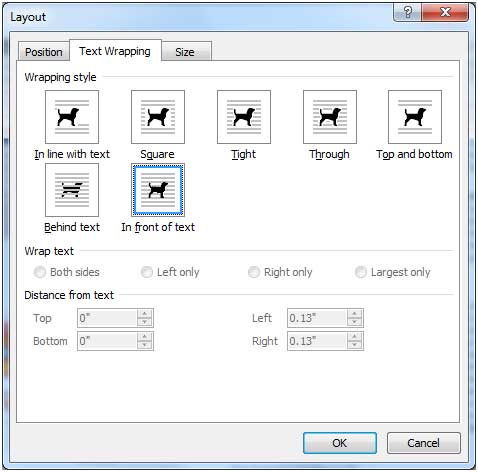
In practice, inserting an image or any other material in your document is quite easy especially if the material already exists in your local storage device. It is just a matter of opening up the image file through the Microsoft Word dialog box or wizard. Sometimes, if the image you would like to insert is on a web page currently displayed on your screen, it could be copied and pasted.The real challenge is where to put the image you inserted or where to move it.In this part of the lesson,we will study the different characteristics of text wrapping options that you can use with the image you integrated in your document.
1.)In Line with Text
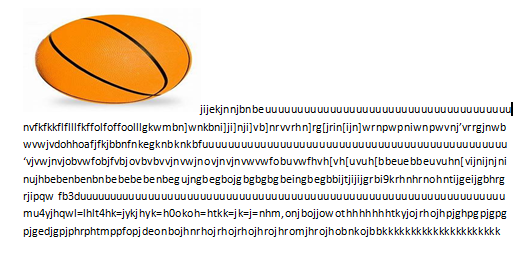
This is the default setting for images that are inserted or integrated in your document. It treats your image like a text font with the bottom side totally aligned with the text line. This setting is usually used when you need to place your image at the beginning of a paragraph. When placed between texts in a paragraph or sentence, it distorts the overall appearance and arrangement of the texts in the paragraph because it will take up the space it needs vertically pushing whole lines of texts upward a in the example below.
2.)Square
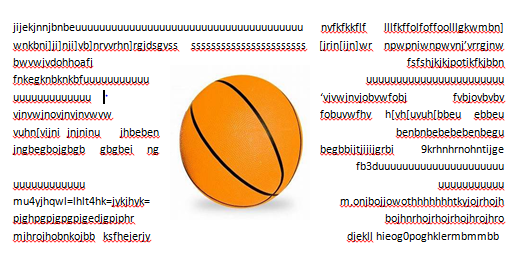
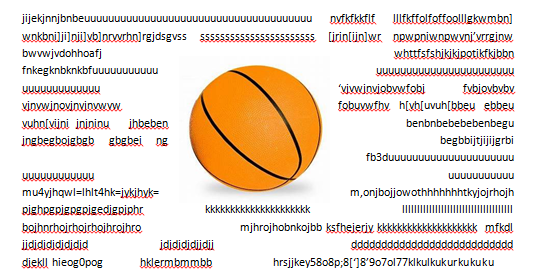
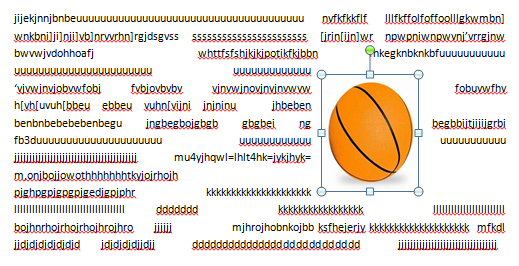
This setting allows the image you inserted to be placed anywhere within the paragraph with the text going around the image in a square pattern like a frame.
3.)Tight
This is almost the same as the Square setting, but here the text “hugs” or conforms to the general shape of the image. This allows you to get a more creative effect on your document.This setting can mostly be achieved if you are using an image that supports transparency like a.GIF or .PNG file.
4.) Through
This setting allows the text on your document to flow even tighter, taking the contours and shape of the image.Again, this can be best use with a .GIF or .PNG type of image.
5.) Top and bottom
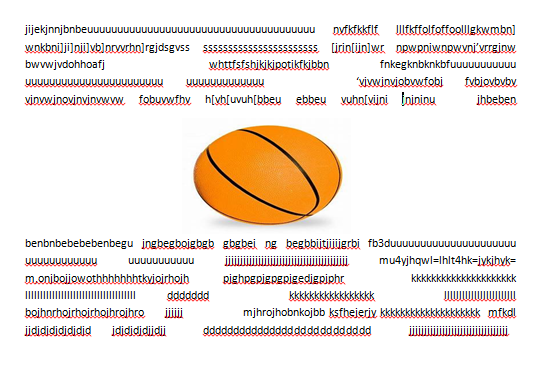
This setting pushes the texts away vertically to the top and/or the bottom of the image so that the image occupies a whole text line on its own as in the example.




 Dawn THE GREAT'S blog